System status panels UI redesign and redevelopment
The university online system status panels were out of brand, and needed updating. A project was started to look at refreshing the designs, and shifting focus more onto how students might use the service, rather than as a dry list. In particular the old system only highlighted key systems, and other important systems were relegated to text lists which were often missed.
The project product owner also wanted to emphasise the page as a whole as a way of communicating more positive messages with students.
Objectives
- Get status panels frontend on brand.
- Add new functionality to highlight the status levels of many different systems.
- Redesign the backend to allow for events to be linked to services.
- Allow for panels displaying images, graphics, and positive messages directed at students.
- Allow for a separate, searchable full service catalog listing.
Actions
Get status panels frontend on brand.
One of the key aims of this project was simply to get the status.kent page on brand. This mainly involved reworking the frontend styles to use the same fonts and classes as the rest of the website. As such, this work came later in the project with redeveloping the frontend code.
Add new functionality to highlight the status levels of many different systems.
The new system needed to show far more detail about each system, while keeping things focused and simple.
The first design action was to draw up detailed Figma prototypes for how the new page might look given the various project criteria. We iterated through serveral versions and options before arriving at a good enough prototype to start developing. Almost always designs have to change from the prototype because of unforeseen issues that we come across in the develop stage.
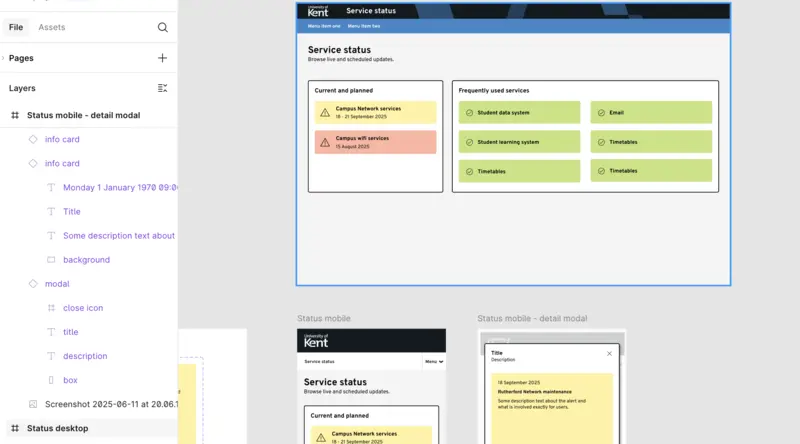
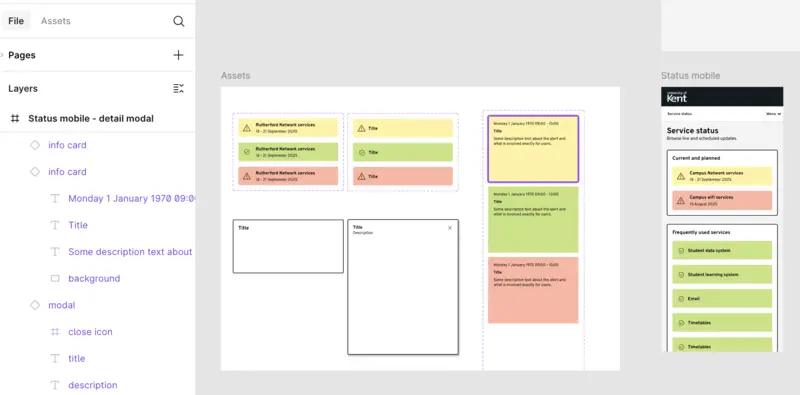
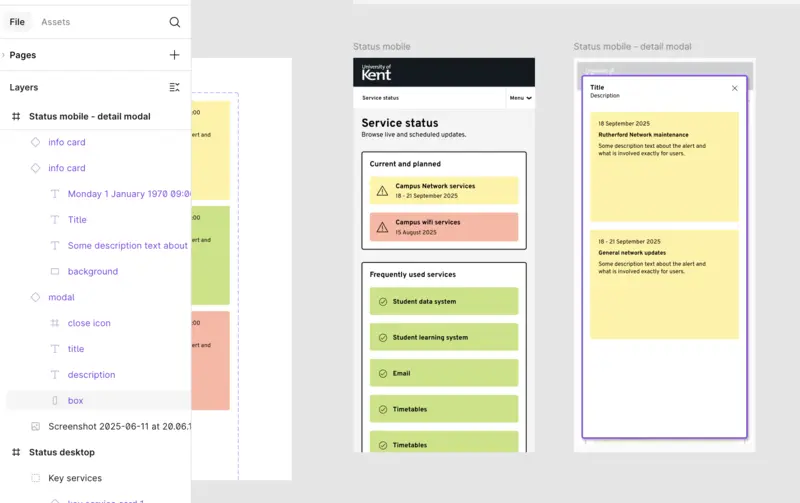
Redesign the backend to allow for events to be linked to services.
Part of the project was to be able to separate key services from general ones, and also to be able to better represent different events for each service, such as maintenance or downtime. Previously, the system just had a list of notices. They did not relate to predefined services in any way, and the list could be confusing.
This meant a total redesign of the backend of the system - using Laravel Nova - along with a new API.
Allow for panels displaying images, graphics, and positive messages directed at students.
This requirement meant we needed to build the page in our existing content management system, so we'd be able to leverage that system's ability to insert visual blocks on the page, and have the page served up on the website.
That meant the frotend had to use javascript to access the new API, and serve up the content dynamically - reloading every minute or so - while the main page remained cached.
I used Alpinejs for a simple one-page micro app. This kept things extremely lightweight and simple.
Allow for a separate, searchable full service catalog listing.
The project needed to have a full, sortable, searchable listing as a separate block. This could be used on the same page, or a completely different page.
Again, I built a small, simple micro app with Alpinejs to show data from the API as a sortable and searchable list.
Lessons learned
This project encompassed:
- needs analysis
- discussions with the project owners
- wireframing and Figma designs
- Laravel development
- API development
- frontend development using Alpinejs
The project worked really well, and delivered exactly what the owners neede, on time. It was great to work through the whole lifecycle, from design to final build.